Transportation management
Freight dispatch software with a live map and exceptions
Planning, dispatch, tracking and exceptions on one board, from the unplanned shipment to the signed proof of delivery.
What it does
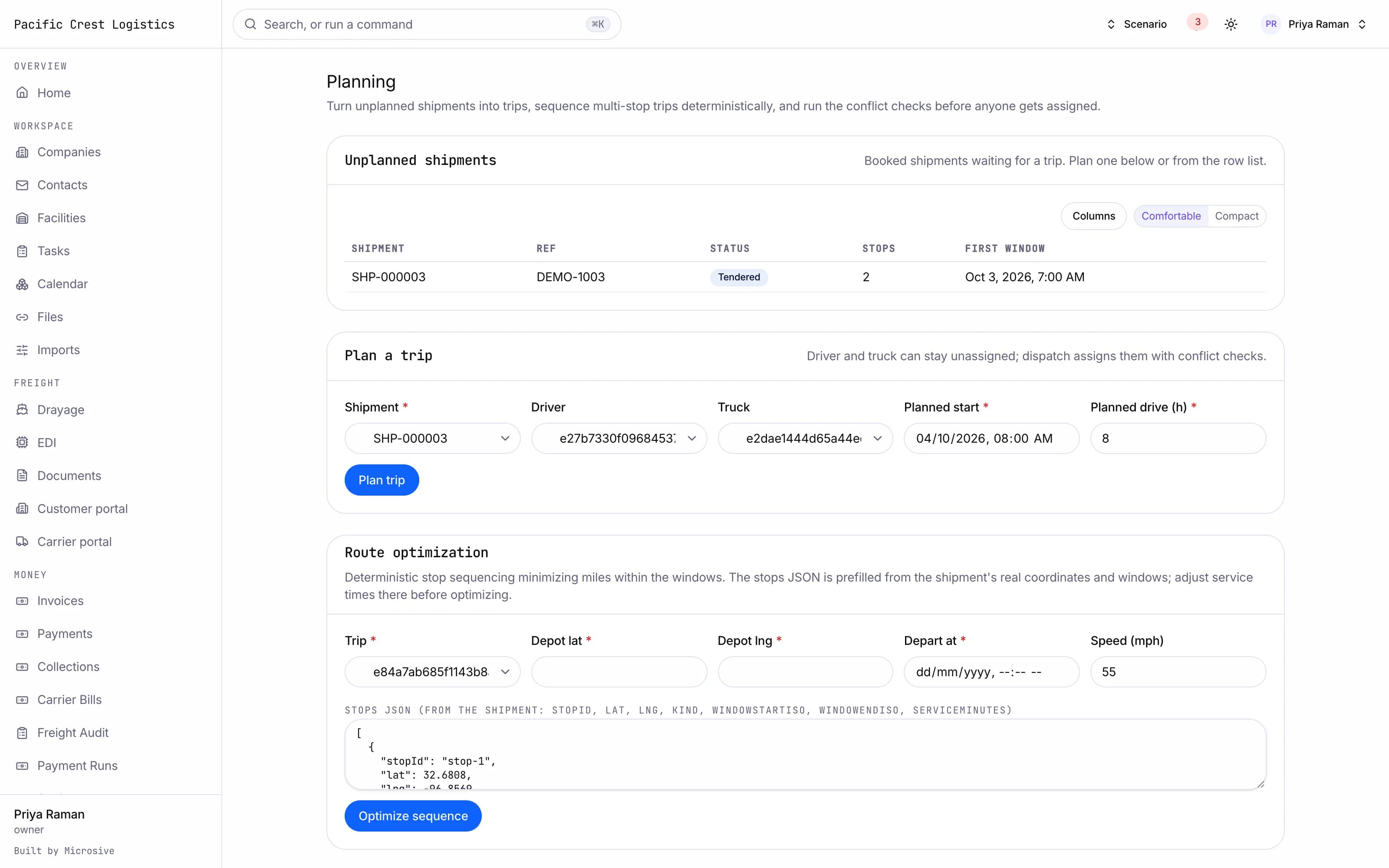
- A planning board where unplanned shipments are dragged into trips and loads.
- Route optimization for multi-stop trips that sequences the stops to minimize miles inside the appointment windows.
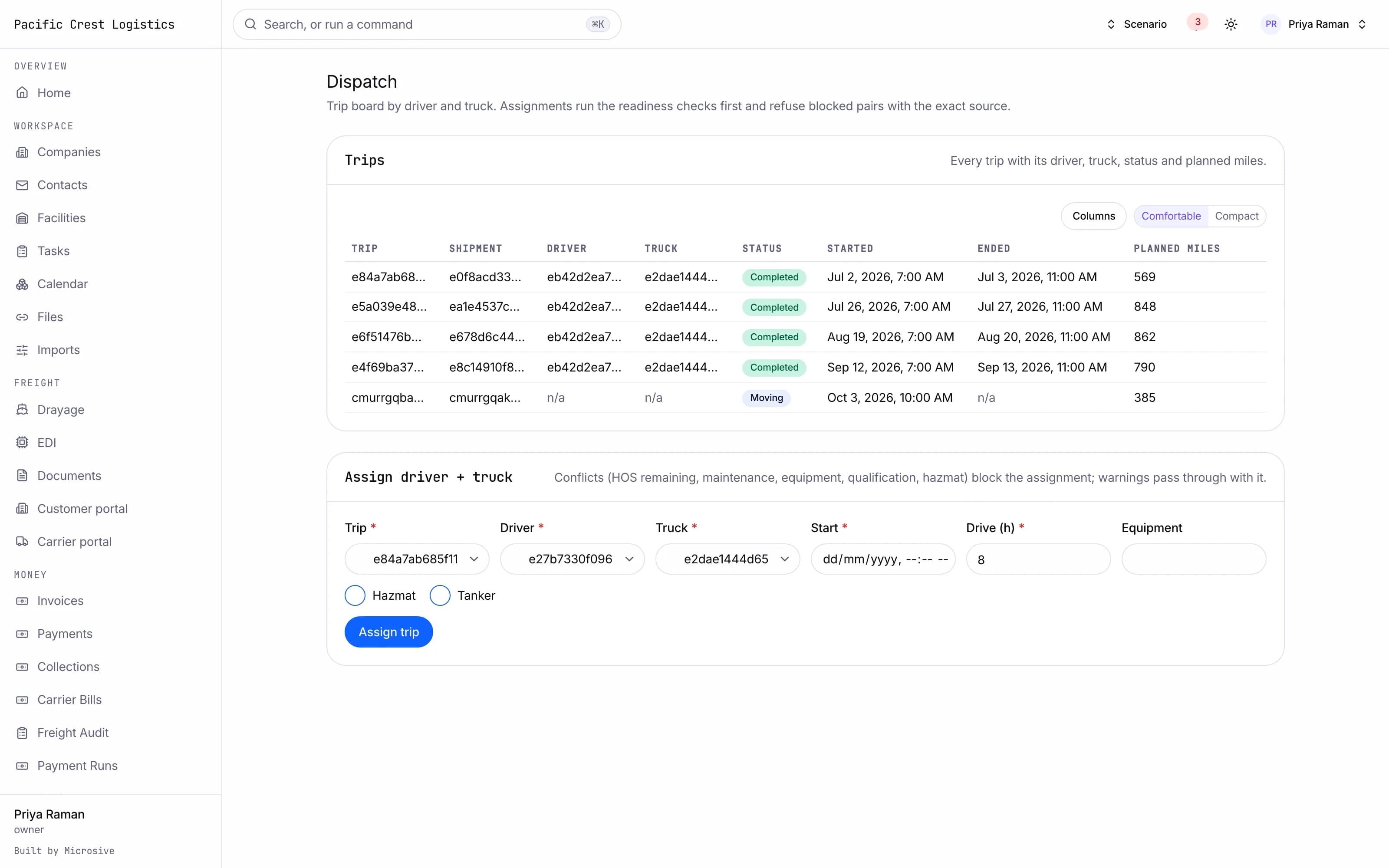
- A dispatch board with status columns by driver and truck, with conflict warnings before an assignment.
- Conflict checks on an assignment: hours of service remaining, maintenance due, equipment mismatch, driver qualification and hazmat endorsement.
- Trip sheets and a dispatch packet as PDF for the driver.
- Appointments with facilities: request, confirm and reschedule against the facility's capacity.
- A live map with vehicle clusters, routes, breadcrumbs and geofences, with a list view beside it.
- Tracking from check calls and manual updates, with driver app, ELD and EDI 214 positions shown on the same timeline when those feeds are connected for your operation.
- A predictive ETA that accounts for hours-of-service breaks and dwell history.
- An exceptions engine for late loads, missing pings, dwell, last free day, temperature excursions, missing proof of delivery, route deviation and hours risk, each with an SLA and an owner.
- Customer notifications on milestones, with rules per customer.
- A public tracking link that is tokenized and expires.
- Proof of delivery captured as a photo and a signature in the driver app, read back into the document record.
- Detention tracked from the geofence timestamps, with the clock on the shipment.
- Reefer temperature readings on the shipment, with an excursion alert when they cross the range you set.
See the workflows
- 01Planning
Unplanned shipments sit in a column; you drag one into a trip and the conflicts are checked before it can dispatch.
- 02Dispatch
The board assigns driver and truck, the trip sheet is generated, and the packet goes to the driver app.
- 03Tracking and exceptions
The live map shows the fleet, and a late load raises an exception with an owner, an SLA and the customer notification that follows.
- 04Proof of delivery
The driver photographs the proof and signs; the document lands on the shipment and the invoice can follow.
Unplanned shipments sit in a column; you drag one into a trip and the conflicts are checked before it can dispatch.
Works with the rest of the system
One record moves through every module, so nobody re-types it.
What you get
- 4steps
On one record, from the booking to the bill.
- 14days
Most builds are handed over in 14 days; your timeline is confirmed in writing after the onboarding call.
- 3months
Free support after handover.
- $0
Per truck, per dispatch or per client.
Questions
How do customers follow their shipments?
Through a public tracking link that is tokenized and expires, plus milestone notifications on the rules each customer chooses.
Does dispatch stop when a driver would go over hours?
The conflict check reads hours of service remaining, maintenance, equipment, qualification and hazmat endorsement, and warns before the assignment goes out.
What happens to our open loads and customers?
Free migration: we review your data with you, agree what moves where, and move it into your new system at no cost. Migration time is agreed at onboarding and comes on top of the build. If your current vendor makes exporting hard, we work with their support or build a workaround.
Who owns the system?
You do. The code and the data are yours, and the system runs on your own server, which we set up for you. There are no per-truck, per-dispatch or per-client fees.